
The AI PCB design tool your agent can actually drive
Schema is a desktop schematic capture and PCB layout tool. Describe a circuit in plain English and an agent places the parts, wires the nets, routes the copper and runs the checks — through the same commands you use yourself. Reads your KiCad and Altium libraries. Free to start on macOS, Windows and Linux.
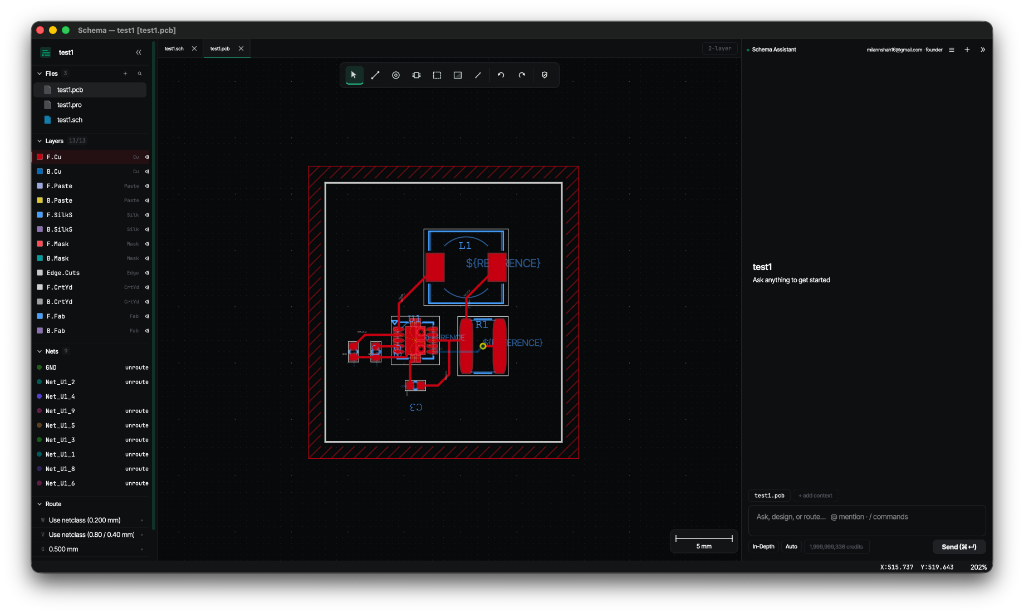
Schema at a glance
- What it is
- Desktop schematic capture and PCB layout, with an AI agent that drives the editor
- Platforms
- macOS on Apple Silicon; Windows and Linux on x86-64 and arm64
- Price
- Free plan with monthly agent credits; extra credits sold in packs
- Reads
- KiCad symbol and footprint libraries, Altium schematic libraries
- Writes
- Gerber RS-274X, Excellon drill (plated and non-plated)
- Checks
- ERC on the schematic, DRC on the board, violations placed on the canvas
- Agent surface
- 74 documented commands, identical for you and the agent
- Latest version
- 1.0.1
The whole loop, in one tool
Schematic to fabrication
Capture a schematic, push the netlist to a board, place footprints, route the copper, pour the ground plane, and export Gerber and Excellon drill files.
An agent surface, not a macro language
A command layer built for perceive / act / verify / recover: an agent can describe the board, make a change, run DRC, look at a render, and undo when it gets it wrong.
Your existing libraries
Reads KiCad symbol and footprint libraries and Altium schematic libraries directly. Point Schema at the parts you already have and keep working.
Rules checked as you go
Clearance, annular ring, edge clearance, unconnected nets and silkscreen conflicts are checked against per-net-class rules, with every violation placed on the board.
Native compatibility
Import your existing KiCad and Altium projects. Work collaboratively on the same files without the hassle of manual conversion or vendor lock-in.
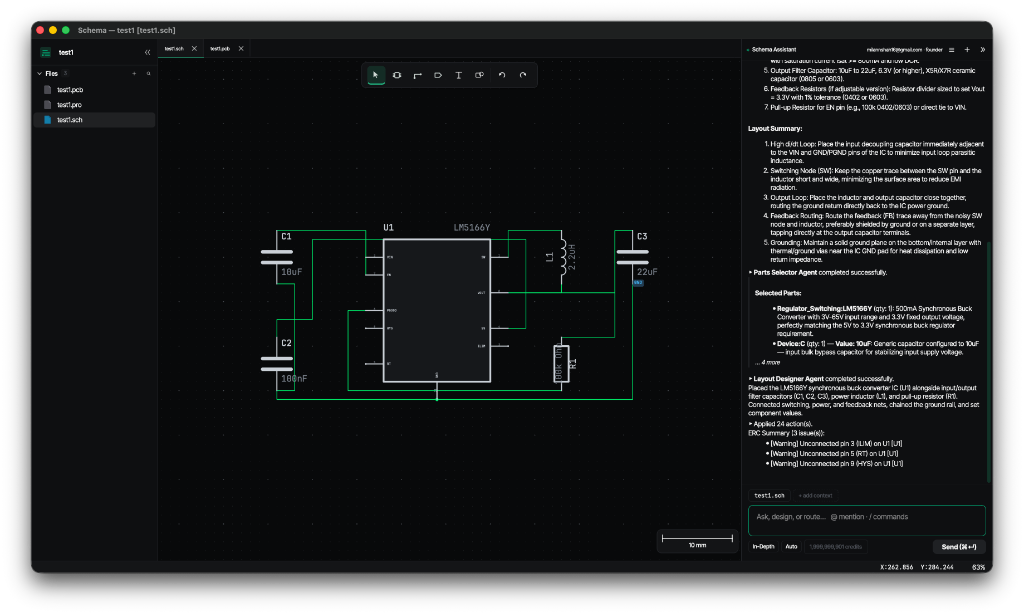
Capture logic with fluid precision
Build your circuit seamlessly. Schema provides a fast, intuitive canvas for wiring up components, managing net labels, and establishing your design intent before laying out the board.
- Native support for KiCad and Altium symbol libraries
- Smart wiring, bus support, and hierarchical sheets
- Real-time ERC (Electrical Rules Check) for catching errors early
- Transition back and forth between schematic and PCB seamlessly with integrated tabs
Layout that holds its own rules
Place footprints from your libraries, route with walk-around collision handling, and pour copper that respects pad clearances the way a fabricator expects.
- Interactive routing with 45° and orthogonal constraints, vias, and net-class track widths
- Zone fill with per-pad clearance, thermal-relief settings and island removal
- Live ratsnest and joint-based connectivity as the board changes
- Gerber RS-274X and Excellon drill export, including plated and non-plated splits
Start here
Guides for the things people actually want to do first.
How Schema compares
Honest comparisons against the tools you are probably choosing between — including what they do better.
Frequently asked questions
What is Schema?
Schema is a desktop AI PCB design and schematic capture tool for macOS, Windows and Linux. You capture a schematic, push it to a board, place footprints, route copper, pour ground planes, run design-rule checks and export Gerber and Excellon drill files. An AI agent can do any of those steps for you by issuing the same commands you would issue yourself.
How much does Schema cost?
There is a free plan that includes a monthly allowance of agent credits. Using the AI agent spends credits, and additional credits are sold in packs. Drawing, routing and exporting by hand are not metered. Full detail is on the pricing page.
Can Schema open my KiCad files?
Yes. Schema reads KiCad symbol and footprint libraries directly, so parts you have already curated work without conversion, and it can convert a KiCad schematic into a Schema project. It also reads Altium schematic libraries.
What does "an EDA tool your agent can actually drive" mean?
It means the AI is not a separate chat window bolted onto the side. The editor exposes 74 documented commands — place a symbol, draw a wire, route a trace, fill a zone, run DRC, render the board, undo — and both you and the agent act through that same surface. The agent can therefore look at the board, change it, check its own work and undo when it gets something wrong.
Is Schema related to schema.org or database schemas?
No. Schema is an electronic design automation tool for designing circuit boards. It has no connection to schema.org, to database schemas, or to the psychology term.
What formats can Schema export for fabrication?
Gerber RS-274X for copper, silkscreen, solder mask and paste layers, and Excellon drill files including separate plated and non-plated output — the set a board house expects.
Design a board with an agent that shows its work
Free to start on macOS, Windows and Linux. Bring your existing KiCad and Altium libraries.